

If you are running an online business, managing marketing campaigns, or handling data across multiple platforms, you already know the biggest headache: getting your apps to talk to each other without breaking the bank.
For years, Zapier has been the go-to king of automation. But as your business grows, Zapier’s pricing can quickly turn into a massive monthly expense that eats into your profit margins.
Enter Pabbly—a powerful, budget-friendly ecosystem that is completely changing the game for automation, email marketing, subscription management, and form building.
In this ultimate Pabbly review, we will deep-dive into everything Pabbly offers, break down its core modules, compare it directly to competitors like Zapier, and find out if it is truly worth your investment.
What is Pabbly?
Pabbly is an all-in-one business management and automation platform designed to replace multiple expensive SaaS tools. Instead of paying separate subscriptions for automation software, email marketing tools, subscription billing portals, and form builders, Pabbly gives you access to a complete suite under one roof.
Unlike other platforms that charge you per feature or penalize your growth with strict limits, Pabbly’s core philosophy centers on affordability and scalability.
The platform is split into five core modules:
- Pabbly Connect (Integration & Automation)
- Pabbly Email Marketing (Bulk Email & Automation)
- Pabbly Subscription Billing (Recurring Billing & Invoicing)
- Pabbly Form Builder (Lead Generation)
- Pabbly Email Verification (List Cleaning)
Let’s look at each module in detail to see how they perform in the real world.
1. Pabbly Connect: The Game-Changing Automation Tool
If there is one tool that has put Pabbly on the global map, it is Pabbly Connect. This is the direct competitor to Zapier and Make (Integromat). It allows you to connect over 1,000+ apps, trigger workflows based on specific events, and pass data between platforms instantly.
The No-Task-Charge Revolution
To understand why Pabbly Connect is disrupting the market, you need to understand how standard automation pricing works.
In Zapier, every single action performed by a workflow counts as a “task,” and you are billed for it. If a multi-step workflow formats a date, looks up a spreadsheet row, and sends a Slack notification, that is 3 separate tasks. If you process 10,000 leads a month, your bill skyrockets.
Pabbly Connect does not charge for internal tasks.
You are only billed for the initial trigger. Internal steps like:
- Data formatting (date, text, numbers)
- Filter steps
- Router/conditional logic steps
…are completely FREE. This single feature can save businesses thousands of dollars every single year.
Key Features of Pabbly Connect
- Multi-Step Workflows: Create complex, branch-based automations using routers to split paths based on custom criteria.
- Advanced Formatters: Easily extract text, modify numbers, convert time zones, or format currency without touching a line of code.
- Instant Triggers (Webhooks): Receive data from any app supporting webhooks instantly, with zero polling delays.
- Iterator Tool: Break down arrays of data (like a list of items inside a single invoice) and process each item individually.
2. Pabbly Email Marketing: Reliable Delivery at Scale
Building a list is only half the battle; sending emails that actually hit the inbox without costing a fortune is the real challenge. Pabbly Email Marketing is built for high-volume senders who want maximum control over their delivery.
Built-In SMTP vs. External Routing
Most email marketing platforms (like Mailchimp or ActiveCampaign) force you to use their shared servers. If other users on those servers send spam, your email deliverability suffers.
Pabbly gives you the ultimate flexibility:
- Built-in Delivery: You can use Pabbly’s native engine for easy setup.
- External SMTP Routing: You can connect Pabbly to high-deliverability, low-cost cloud SMTPs like Amazon SES, Mailgun, SendGrid, or Postmark.
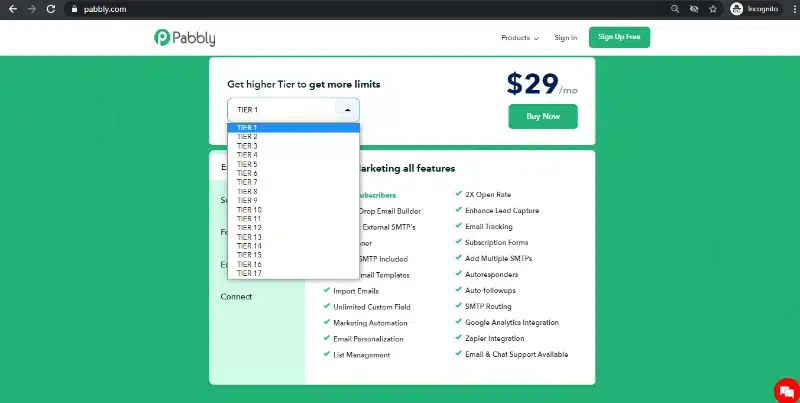
By routing Pabbly through Amazon SES, you can send 10,000 emails for literally $1, achieving incredible inbox rates while slashing your traditional email marketing software costs by up to 80%.
Key Features
- Marketing Automation: Build automated welcome sequences, behavioral triggers, and follow-up drip campaigns.
- Subscription Forms: Design responsive pop-ups and embedded forms to capture leads directly on your website.
- Auto-Responders & Cleaners: Automatically handle bounces, unsubscribes, and spam complaints to maintain a pristine sender reputation.
3. Pabbly Subscription Billing: Effortless Recurring Revenue
Managing recurring payments, failed credit cards, and customer invoices can turn into an accounting nightmare. Pabbly Subscription Billing simplifies this entire process for SaaS companies, agencies, e-commerce brands, and digital creators.
Zero Transaction Fees
Most subscription platforms (including Stripe Billing or Chargebee) take a percentage cut of your revenue or charge steep monthly fees once you hit a certain sales volume.
Pabbly charges absolutely 0% transaction fees. Whatever you earn belongs entirely to you, minus your payment gateway’s standard processing fee.
Key Features
- Multi-Gateway Integration: Connect seamlessly with Stripe, PayPal, Razorpay, Authorize.Net, and more.
- Flexible Billing Models: Set up one-time payments, recurring cycles (weekly, monthly, annual), setup fees, free trials, or metered billing based on usage.
- Advanced Dunning Management: Automatically email customers when their credit cards fail, retry payments on customized schedules, and prevent revenue churn without manual intervention.
- Affiliate Management System: Pabbly includes a built-in module allowing you to launch, track, and manage your own affiliate program for your products seamlessly.
4. Pabbly Form Builder: Unlimited Flexibility
Many form builders limit the number of submissions you can receive, the number of fields you can add, or force a giant watermark on your forms unless you upgrade to an enterprise tier.
Pabbly Form Builder provides full access to every single feature across all forms. Whether you need a simple contact form, a multi-page survey, an order form with payment integration, or a detailed lead capture page, it handles it smoothly.
Key Features
- Unlimited Submissions & Views: No caps on how many leads you can collect.
- Payment Collection: Embed payment fields directly into your forms via Stripe or PayPal to sell digital products or accept donations.
- Conditional Logic: Show or hide fields dynamically based on the answers a user provides in previous questions.
- Full Customization: Control padding, colors, fonts, backgrounds, and layout without needing custom CSS skills.
5. Pabbly Email Verification: Protect Your Domain Reputation
Sending emails to dead, fake, or invalid email addresses ruins your sender score, causing future emails to land directly in the spam folder. Pabbly Email Verification cleans your list at a microscopic level.
Unlike real-time verifiers that often return inaccurate results or take hours, Pabbly uses a slow, highly accurate verification process that pings mail servers directly without sending actual emails. It effectively weeds out catch-all domains, spam traps, syntax errors, and temporary addresses so your email metrics stay perfect.
Pabbly vs. Zapier: A Head-to-Head Comparison
For most users, the big decision comes down to Pabbly Connect vs. Zapier. Let’s see how they stack up in key areas.
| Feature | Pabbly Connect | Zapier |
| Price | Highly affordable (One-time options available) | Expensive monthly plans |
| Internal Tasks Cost | Free / $0 | Counts against your monthly quota |
| Workflows | Multi-step included on all paid tiers | Limited on lower-tier plans |
| App Integrations | 1,000+ (Rapidly growing) | 5,000+ |
| Webhooks/Instant Triggers | Included | Premium feature (Paid tiers only) |
| Customer Support | Excellent (Active forum, video guides) | Ticket-based (Priority costs extra) |
The Verdict on the Comparison
While Zapier has a larger directory of niche apps, Pabbly covers all major platforms (Google Sheets, Facebook Ads, Shopify, WooCommerce, Slack, CRM platforms, and email tools). If your core stack is supported, Pabbly is the undisputed winner for your wallet.
The Pros and Cons of Choosing Pabbly
To keep this review completely transparent, let’s look at what makes Pabbly incredible, and where it still has room to grow.
The Pros
- Unmatched Cost Savings: The “no charge for internal tasks” rule makes it an absolute financial lifesaver for data-heavy operations.
- All-in-One Suite Access: You get an entire suite of tools that work together seamlessly, eliminating software clutter.
- Insanely Fast Customer Support: They have an incredibly active community forum, comprehensive video documentation, and a support team that frequently builds custom integrations upon user request.
- User-Friendly Interface: Clear, intuitive drag-and-drop mechanics make it easy for beginners while maintaining advanced depth for tech-savvy developers.
The Cons
- Fewer Niche Integrations: While they add new apps daily, they don’t quite match Zapier’s massive directory of obscure software. (Though this is easily solved via Pabbly’s robust HTTP/Webhook module).
- Separate Tool Dashboards: The modules are distinct systems, which means switching between email marketing and subscription billing requires navigating back to a central portal.
Who is Pabbly Perfect For?
Pabbly isn’t just another shiny software option; it’s an operational asset for:
- Digital Marketing Agencies: Automate lead reporting, sync Facebook Lead Ads directly to client CRMs, and manage bulk email clients without paying massive overhead costs.
- E-commerce Store Owners: Connect Shopify or WooCommerce to shipping portals, inventory tracking sheets, and customer retention tools smoothly.
- SaaS Founders & Creators: Set up recurring subscription models, manage customer dunning, run a referral network, and handle transactional emails seamlessly.
- Freelancers & Small Business Owners: Streamline daily administration, save precious hours on manual data entry, and scale up without worrying about unexpected subscription bills.
Final Thoughts: Is Pabbly Worth It?
Software costs shouldn’t punish you for being successful. If you are tired of watching your monthly bills jump every time your automation workflows run or your email list expands, Pabbly is the perfect solution.
It balances ease of use, rock-solid reliability, and incredible cost efficiency in a way few other SaaS companies manage to pull off.
Ready to streamline your business workflows, protect your profit margins, and unlock unlimited automations?
👉 Click here to get started with Pabbly today and transform your business operations!


