

Building an audience is one of the biggest challenges for bloggers, content creators, and independent publishers. Social media can help you reach new people, but relying entirely on third-party platforms means you have limited control over how and when your audience sees your content.
That is where Kit comes in.
Formerly known as ConvertKit, Kit is an email marketing platform designed specifically for creators. It helps users build email lists, send newsletters, automate email sequences, create landing pages, and monetize their audiences through digital products and paid subscriptions.
According to its official website, Kit serves more than 550,000 creator business owners. The platform combines audience growth, email marketing, automation, and monetization tools in one place.
But is Kit worth using in 2026? How much does it cost, and is it suitable for bloggers who are just starting out?
In this Kit review, we examine its main features, pricing, advantages, disadvantages, and ideal use cases to help you decide whether it fits your creator business.
What Is Kit?
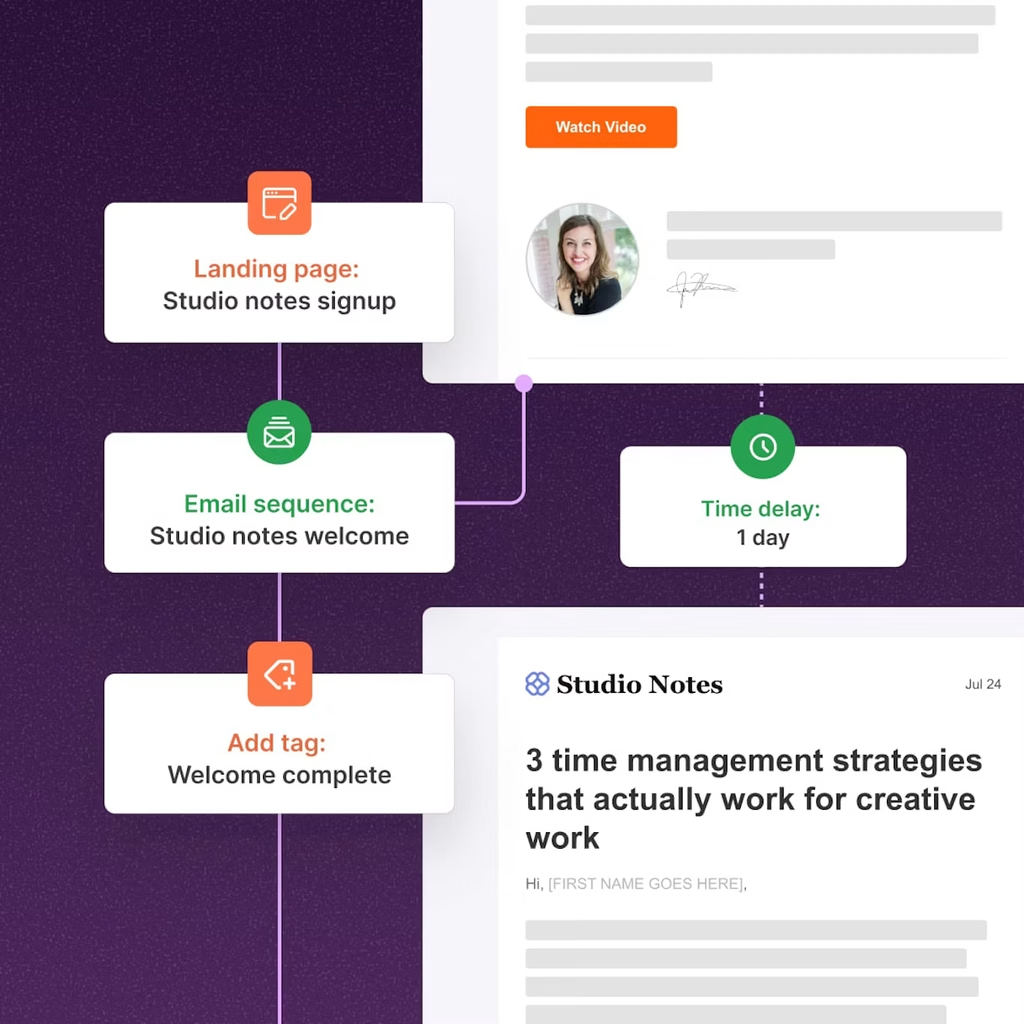
Kit is an email marketing and audience development platform built for people who make a living from their content.
Its primary audience includes bloggers, newsletter writers, authors, podcasters, YouTubers, educators, and other independent creators who want to establish direct relationships with their followers.
Rather than focusing exclusively on traditional email campaigns, Kit helps creators develop an audience and turn that audience into a sustainable business.
With Kit, users can:
- Collect email subscribers through landing pages and signup forms.
- Send newsletters and promotional email broadcasts.
- Create automated welcome sequences and email funnels.
- Organize subscribers using tags and segments.
- Sell digital products and paid newsletter subscriptions.
- Discover new readers through creator recommendations.
- Connect their email marketing workflows with other applications.
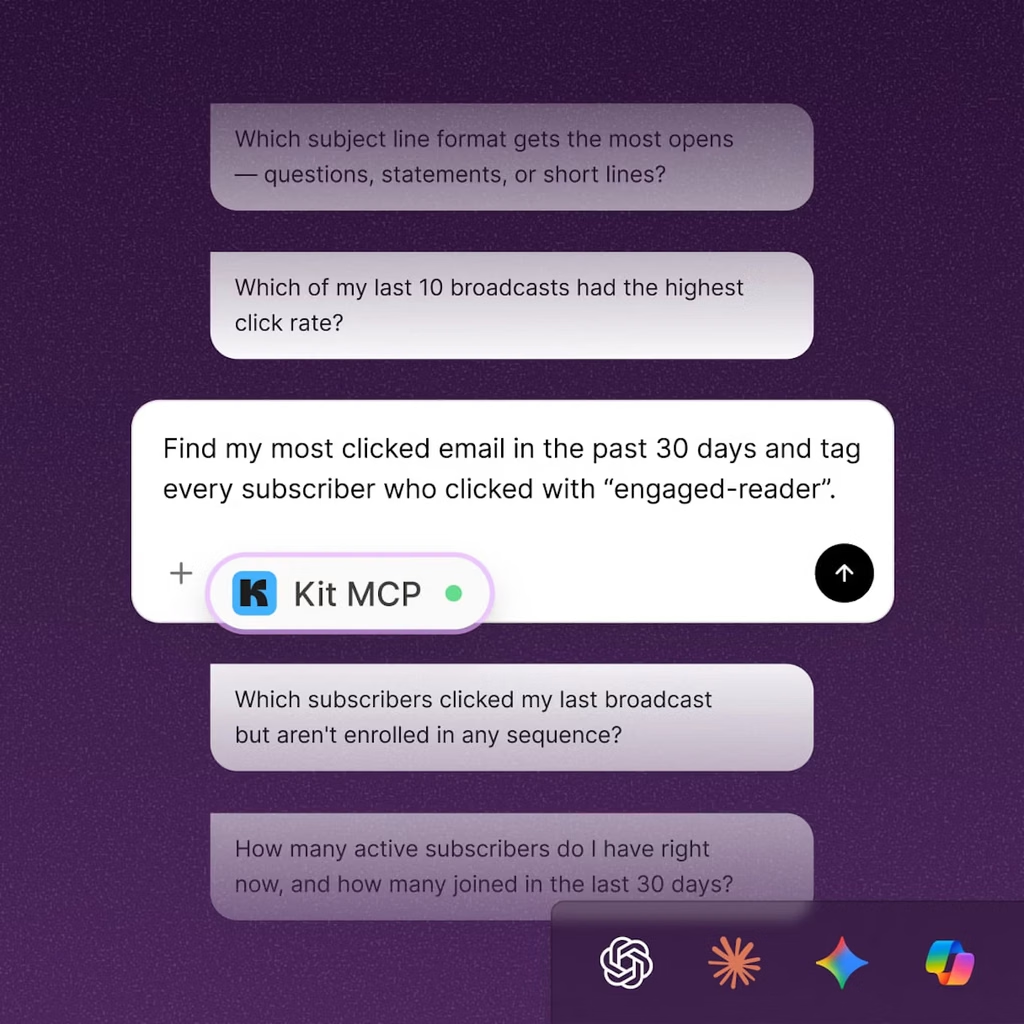
The platform also offers integrations and AI-related capabilities designed to help creators manage their marketing activities more efficiently.
Our verdict so far: Kit is particularly relevant to creators who consider email a core part of their publishing and revenue strategy, rather than simply another channel for occasional promotions.
Key Kit Features for Bloggers and Content Creators
1. Email Marketing and Newsletter Publishing
Email marketing is at the heart of Kit’s offering.
Users can create and send newsletters, announce new blog posts, share curated resources, promote products, and maintain regular communication with subscribers.
The email editor is designed to help creators produce branded emails without requiring extensive technical knowledge. Users can also reuse content and customize messages to match their publishing style.
Kit supports unlimited email broadcasts across its advertised plans, although subscriber limits and other features depend on the plan you choose.
For bloggers, this means you can use one platform to distribute new articles, share exclusive insights, and bring readers back to your website.
For example, a personal finance blogger could send a weekly newsletter containing budgeting tips, links to new articles, and recommendations for relevant tools.
A travel creator could share destination guides, travel stories, and product recommendations with subscribers who have expressed interest in particular destinations.
The key advantage is consistency: instead of waiting for social media algorithms to distribute your content, you can communicate directly with people who have opted in to receive your emails.
2. Landing Pages and Signup Forms
You do not necessarily need a separate website to begin building an email list with Kit.
The platform provides landing pages and signup forms that help creators collect subscriber information and offer incentives, such as downloadable guides, checklists, templates, or other free resources.
You can create multiple landing pages and forms to support different campaigns and audience segments.
For example, a productivity blogger could offer a free weekly planner in exchange for an email subscription. A food blogger could provide a downloadable recipe collection, while a marketing consultant could distribute a free SEO checklist.
Kit also supports customizable domains, form templates, and subscriber growth reporting.
These tools make it easier to build a simple lead-generation system without assembling several separate services.
3. Visual Automations and Email Sequences
Email automation is one of Kit’s most important features for creators who want to scale their businesses.
With Visual Automations, users can create workflows that respond to subscriber actions, interests, and other conditions.
A typical welcome sequence might look like this:
- A visitor signs up for a free resource.
- Kit sends an automatic welcome email.
- The subscriber receives several educational emails over the following days.
- The workflow introduces a relevant product, service, or paid subscription.
- Future messages can be tailored to the subscriber’s interests.
This process allows creators to establish relationships with new subscribers without manually sending every message.
Kit’s Creator and Pro plans include unlimited Visual Automations and email sequences, according to its current pricing information.
For a blogger selling digital products or a creator running an online course business, these workflows can help maintain engagement and support sales throughout the customer journey.
However, automation works best when the content is relevant and useful. A complicated funnel cannot compensate for an unengaged audience or an offer that does not match subscribers’ needs.
4. Audience Segmentation and Personalization
Not every subscriber wants the same content.
Kit allows creators to organize subscribers using tags and segments, helping them deliver more relevant messages to different groups.
For example, a technology blogger might categorize subscribers interested in AI tools separately from those who prefer productivity software.
A fitness creator could distinguish between subscribers interested in home workouts, nutrition, and training programs.
Segmentation helps reduce irrelevant messages and makes it easier to tailor campaigns to specific interests.
Kit also supports personalized email content, allowing creators to show different content to different subscribers within the same email when configured appropriately.
For creators with growing audiences, these capabilities can make email marketing more targeted without requiring a completely separate newsletter for every topic.
5. Monetization: Digital Products and Paid Newsletters
Kit is not limited to collecting subscribers and sending emails. It also provides tools for monetizing an audience.
Depending on the available features and configuration, creators can use Kit to sell digital products, offer paid newsletter subscriptions, establish recurring memberships, and accept tips.
Potential products include:
- E-books and downloadable guides.
- Templates, worksheets, and digital resources.
- Premium newsletter subscriptions.
- Memberships and recurring content packages.
- Educational resources and other creator products.
This integrated approach can reduce the need to manage separate tools for email marketing and basic digital-product sales.
Kit’s pricing page currently lists a transaction fee of 3.5% plus $0.30 for digital product and subscription transactions, alongside its stated 0.6% Kit fee. Payment processing and other applicable charges should be checked before choosing a plan.
Creators should review the current fee structure and applicable terms carefully, particularly when selling low-priced products or processing a large volume of transactions.
6. Creator Recommendations and Audience Growth
Growing an email list is often harder than sending emails to an existing audience.
Kit offers a Creator Network and recommendation features that allow creators to recommend other newsletters and potentially receive recommendations in return.
This creates opportunities to reach audiences beyond your existing website traffic and social media following.
For instance, a travel blogger could connect with complementary travel newsletters, while a creator focused on writing could collaborate with authors and publishing experts.
Kit’s free plan includes basic recommendations, while additional recommendation and referral capabilities vary by plan.
The effectiveness of these features depends on your niche, the quality of your content, and the relevance of potential partners. They should be treated as additional growth channels rather than a guarantee of subscriber growth.
Kit Pricing: How Much Does It Cost?
Kit offers a free plan and paid Creator and Pro plans. Pricing depends on your subscriber count, billing frequency, and any applicable promotional offers.
The official pricing page currently displays the following prices for an account with 1,000 subscribers:
| Plan | Advertised price | Best for |
|---|---|---|
| Free | $0/month | Beginners building an email list |
| Creator | $33/month, billed annually | Growing creators who need automation |
| Pro | $50/month during the displayed first-year promotion | Established creators needing advanced tools |
The Creator price is advertised as $390 per year, while the Pro page displays a promotional first-year price of $593, compared with a listed standard price of $66 per month. These offers may change, and the Pro promotional price should not be assumed to apply to every account.
Free Plan
Kit’s Free plan supports up to 10,000 subscribers and includes:
- Unlimited landing pages and signup forms.
- Unlimited email broadcasts.
- Audience tagging and segmentation.
- Digital product and subscription sales.
- Basic creator recommendation features.
This is an attractive starting point for bloggers who want to test email marketing without committing to a monthly subscription.
The main trade-off is that advanced automation, reporting, and certain growth features are reserved for paid plans.
Creator Plan
The Creator plan adds tools designed for creators who need more sophisticated email workflows.
Key features include unlimited Visual Automations and email sequences, subject-line A/B testing, removal of Kit branding, additional integrations, RSS campaigns, and 24/7 email and chat support.
This plan is particularly useful for bloggers who publish regularly, sell digital products, or want to automate their subscriber onboarding process.
Pro Plan
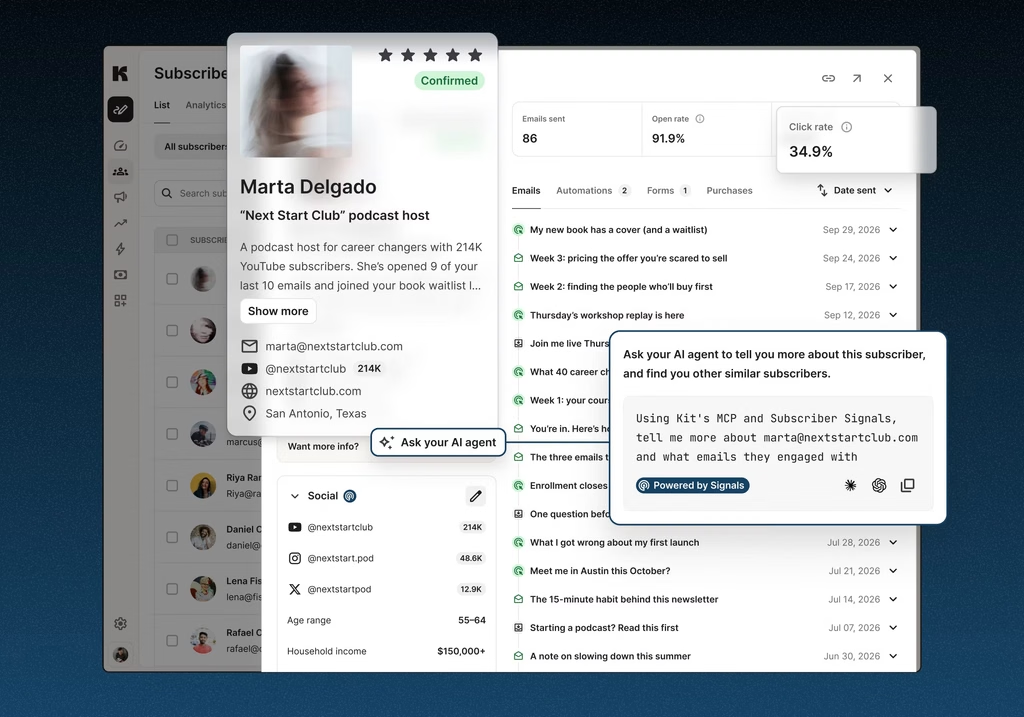
The Pro plan adds advanced audience insights, engagement analytics, deliverability reporting, subscriber engagement scoring, collaborative editing, a newsletter referral system, and other growth-focused features.
It is more suitable for established creators who need detailed performance data, manage larger teams, or actively optimize their email marketing funnel.
Which plan should you choose?
Start with Free if you are building your first email list. Consider Creator when automation becomes essential to your workflow. Upgrade to Pro when you can justify the additional cost through better reporting, collaboration, or audience growth capabilities.
Always confirm the price for your actual subscriber count before purchasing.
Pros and Cons of ConvertKit
Pros
1. Creator-focused design
Kit is built around the needs of bloggers, newsletter publishers, and independent creators rather than only traditional business marketing teams.
2. Generous free plan
The advertised limit of 10,000 subscribers makes the Free plan worth considering for beginners who want to build an audience before investing in paid software.
3. Strong email automation
Visual Automations and email sequences help creators welcome subscribers, nurture relationships, and promote relevant products automatically.
4. Multiple monetization options
The ability to sell digital products and paid subscriptions can help creators connect audience growth with revenue generation.
5. Audience segmentation
Tags, segments, and personalized content help creators deliver more relevant emails as their subscriber lists grow.
6. Integrations and creator partnerships
Kit’s App Store and Creator Network provide additional opportunities to connect tools and expand reach.
Cons
1. Paid plans can become expensive
The cost increases with subscriber count. Creators should compare the subscription price with the revenue and time savings they realistically expect.
2. Advanced reporting requires a higher-tier plan
Users who need detailed deliverability reports, subscriber engagement scoring, and advanced attribution-style insights may need Pro.
3. Some capabilities may be unnecessary for beginners
Creators who only need occasional email announcements may not benefit from advanced automations, monetization features, or audience analytics.
4. Additional transaction fees apply
Creators selling digital products should factor in Kit’s stated fees and applicable payment-processing charges when calculating profit margins.
5. Results depend on content and audience quality
Kit can help distribute and automate marketing, but it cannot guarantee high open rates, subscriber growth, product sales, or deliverability outcomes.
Is Kit Good for Affiliate Marketers?
Kit can be useful for bloggers and creators who incorporate affiliate recommendations into their original content.
For example, a software blogger could publish tutorials, send educational newsletters, and recommend relevant tools through disclosed affiliate links. A creator focused on photography could share useful techniques alongside recommendations for cameras or editing software.
However, Kit does not permit every type of affiliate marketing.
Its official acceptable-use guidance states that affiliate marketing should be clearly disclosed and remain a supporting part of a creator’s broader business and original content. Kit gives an illustrative guideline of approximately 70–80% original business-related content and 20–30% affiliate-related content.
The platform also restricts certain affiliate topics, including education, loans, online pharmacies, and get-rich-quick software.
Affiliate publishers should also avoid unsolicited email campaigns, misleading claims, and undisclosed commercial relationships. Compliance with Kit’s rules and applicable email marketing laws is essential.
Kit Affiliate Program: Can You Earn by Promoting Kit?
Creators and bloggers who publish content about email marketing tools may also consider joining the Kit Affiliate Program.
According to Kit’s official affiliate page, the program offers 50% commission on referred customers’ payments during their first 12 months.
Qualifying affiliates can also earn recurring commissions beyond the first year:
- Base: 50% commission during the first 12 months.
- Bronze: 50% during the first 12 months, plus 10% recurring commission afterward.
- Silver: 50% during the first 12 months, plus 15% recurring commission afterward.
- Gold: 50% during the first 12 months, plus 20% recurring commission afterward.
The published qualification thresholds are 10 paying referrals for Bronze, 50 for Silver, and 100 for Gold. Recurring commissions depend on maintaining the required status and meeting the program’s applicable conditions.
Kit also states that referrals generated through paid methods such as pay-per-click advertising do not count toward the number of paid accounts accumulated for affiliate status. Program terms can change, so check the official details before applying.
This program may be relevant to bloggers publishing email marketing tutorials, newsletter platform comparisons, creator-business resources, or software reviews.
For stronger conversion potential, create genuinely useful content that explains who Kit is for, demonstrates relevant features where possible, and compares its costs with alternative solutions. Include a clear affiliate disclosure whenever you use compensated links.
Kit vs. Other Email Marketing Platforms
Kit is not the only platform available to creators. The best alternative depends on your audience, technical requirements, budget, and monetization model.
| Platform | Best suited for | Main consideration |
|---|---|---|
| Kit | Bloggers, newsletter publishers, and creators | Creator-focused email automation and monetization |
| Mailchimp | Businesses seeking broader marketing tools | Evaluate its current pricing and plan-specific limits |
| beehiiv | Newsletter publishers focused on audience growth | Compare its newsletter publishing and monetization features |
| MailerLite | Bloggers and small businesses seeking email and website tools | Compare automation, subscriber limits, and pricing |
These are general positioning differences, not a definitive performance ranking. Features and prices change, so compare the current plans before making a decision.
If your priority is a creator-oriented email workflow with integrated audience growth and monetization features, Kit deserves consideration. If you need a broader business marketing suite or a newsletter-first publishing environment, another platform may better match your workflow.
Who Should Use Kit?
Kit is a strong candidate for the following users:
- Bloggers: Build an email list, distribute new articles, and develop repeat readership.
- Newsletter creators: Publish regular content and explore paid subscriptions or sponsorship opportunities.
- Authors: Share updates, nurture readers, and promote books or digital resources.
- YouTubers and podcasters: Convert followers into email subscribers and maintain direct communication.
- Digital product sellers: Automate onboarding and promote products through email sequences.
- Affiliate content publishers: Incorporate relevant, disclosed recommendations into original content while following Kit’s acceptable-use rules.
Kit may be less suitable for users who only send occasional announcements, need highly specialized enterprise marketing features, or have no clear strategy for building and engaging an email audience.
Final Verdict: Is Kit Worth It?
Kit is a compelling email marketing platform for creators who want to build an audience they can reach directly, automate communications, and explore multiple revenue streams.
Its biggest strengths are its creator-focused approach, generous free subscriber allowance, visual automation tools, and built-in options for selling digital products and subscriptions.
Its main limitations are the cost of paid plans as an audience grows, the need to upgrade for certain advanced features, and the fact that successful email marketing still requires relevant content and consistent audience engagement.
For beginners, the Free plan provides a practical way to start building an email list. Growing bloggers may benefit from the Creator plan, while established publishers with more demanding analytics and collaboration requirements should evaluate Pro.
Our recommendation: If email marketing is central to your creator business, start by exploring Kit’s free offering and testing whether its workflow suits your publishing strategy. Review the pricing and policy details before committing to a paid plan.
Ready to build your audience?
Affiliate disclosure: This article may contain affiliate links. If you purchase a product or subscribe through a qualifying link, we may earn a commission at no additional cost to you. Our recommendations should be based on relevance, product features, and suitability for readers.
Frequently Asked Questions About Kit
Is Kit free to use?
Yes. Kit offers a Free plan for up to 10,000 subscribers, including unlimited landing pages, forms, email broadcasts, tagging, and segmentation. Advanced features require a paid plan.
Is Kit the same as ConvertKit?
Yes. Kit is the current brand name of the email marketing platform formerly known as ConvertKit. Some older articles, tutorials, and integrations may still use the former name.
Does Kit support email automation?
Yes. Kit’s paid Creator and Pro plans include Visual Automations and automated email sequences, allowing creators to build workflows for welcoming subscribers, nurturing leads, and promoting products.
Can I sell products using Kit?
Yes. Kit supports digital product sales and paid subscriptions. Review the current transaction fees, payment-processing costs, and applicable terms before launching a product.
Can affiliate marketers use Kit?
Yes, in certain circumstances. Affiliate links must comply with Kit’s acceptable-use policy. Affiliate marketing should support original creator content rather than serve as the sole purpose of an account’s email activity. Some affiliate topics are prohibited.
Is Kit good for beginner bloggers?
Kit can be a suitable option for beginner bloggers who want to collect email subscribers and develop a newsletter. The free plan allows users to test the platform before committing to a paid subscription.
How does the Kit Affiliate Program work?
Kit advertises 50% commission on referred customers’ payments during their first 12 months, with additional recurring commissions available to affiliates who qualify for Bronze, Silver, or Gold status. Review the current official terms for eligibility, payout conditions, and restrictions.


