

If you have spent any time in the digital design ecosystem over the last few years, you know the familiar pain of the traditional web design pipeline. You sketch an idea, spend days perfecting high-fidelity mockups in Figma, hand them over to a developer (or spend a week wrestling with complex CSS structures in Webflow), only to find that the final live website loses half of its visual magic in translation.
For years, we accepted this friction as the cost of doing business. But the web design landscape has shifted dramatically.
What started as a complex JavaScript prototyping library has evolved into arguably the most powerful, design-first, no-code website builder on the market. If you can design it in Figma, you can deploy it live on the web with Framer in a single click—no engineering degree required.
In this comprehensive Framer review, we will dive deep into its core features, performance capabilities, SEO tools, and how it stacks up against giants like Webflow and Figma. By the end of this guide, you will know exactly whether Framer is the right tool to scale your agency, business, or personal portfolio.
What Exactly is Framer?
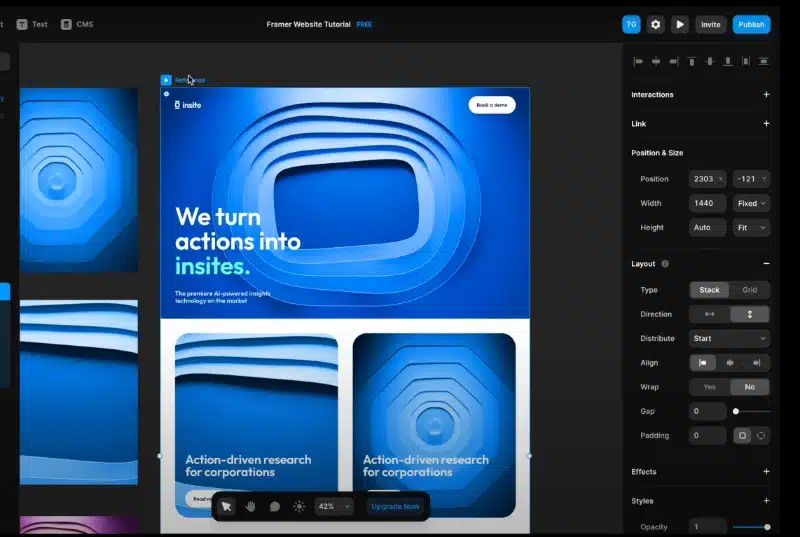
Framer is a cloud-based web design and publishing platform that allows you to design and build responsive websites interactively on a visual canvas. Unlike traditional content management systems (CMS) like WordPress or rigid drag-and-drop builders like Wix, Framer treats the canvas exactly like a professional design tool.
If you know how to use Figma, Framer’s interface will feel instantly familiar. You use familiar concepts like frames, stacks, and components. The revolutionary difference is underneath the hood: Framer’s canvas writes clean, production-ready React code in real-time as you draw.
When you press “Publish,” your design is instantly converted into a blazing-fast, static website hosted on a world-class global Content Delivery Network (CDN).
Core Features That Make Framer a Game-Changer
To truly understand why millions of designers and startups are migrating their web presence to Framer, we need to take a look under the hood at its flagship features.
1. The Figma Copy-Paste Pipeline
The absolute killer feature for modern designers is Framer’s official Figma integration. Thanks to the Framer Figma plugin, you can literally select your design layers in Figma, hit copy, switch over to Framer, and paste them directly onto your canvas.
Framer automatically attempts to convert Figma’s Auto Layout structures into its own responsive Stacks (Flexbox layout). While you will still need to tweak responsive constraints for mobile breakpoints, this single feature cuts layout production times by roughly 60% to 70%.
2. Layouts Powered by Stacks and Grids
If you have ever tried to explain standard CSS layout mechanics like Flexbox or CSS Grid to a visual designer, you know it can feel like teaching advanced mathematics. Framer solves this by turning complex layout models into highly intuitive visual controls called Stacks and Grids.
- Stacks: Automatically arrange elements vertically or horizontally, managing distribution, alignment, and gaps with simple slider controls.
- Grids: Allow you to create complex, multi-column bento box layouts that automatically adapt across desktop, tablet, and mobile breakpoints.
3. High-Fidelity Animations (Without the Math)
In traditional web development, creating smooth, physics-based scroll animations or hover effects requires custom JavaScript libraries like GSAP or Framer Motion code.
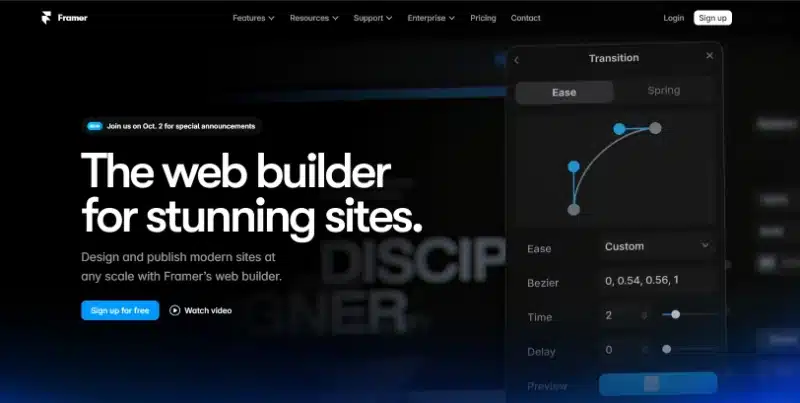
Framer brings the raw power of the Framer Motion library directly into a visual sidebar. Creating a premium, high-converting scroll interaction is a matter of clicking an element, selecting an effect (like Fade, Spin, or Scale), and tweaking a visual spring physics curve.
Because these interactions are powered by native browser technologies, they run flawlessly at 60 frames per second without bloating your code or draining your users’ device batteries.
4. A Lightning-Fast, Visual CMS
A website isn’t truly scalable without a structured backend to manage content like blogs, case studies, or team profiles. Framer includes a built-in Content Management System (CMS) that balances raw power with absolute simplicity.
You can set up custom collections (e.g., “Blog Posts”), define specific fields (Plain text, Rich Text, Images, Dates, Slugs), and instantly link those data fields to your visual designs. Writing a new article or launching a new product landing page becomes as simple as filling out a clean, minimalist form.
Performance, Hosting, and Core Web Vitals
A beautiful design means absolutely nothing if your website takes 5 seconds to load on a mobile device. Google penalizes slow websites heavily, making performance a non-negotiable metric for modern business owners.
Framer sites are fast out of the box because they do not rely on bloated legacy databases. When you hit publish, Framer generates optimized, static HTML, CSS, and modern JavaScript files.
| Performance Factor | Framer Infrastructure Capability |
| Hosting Infrastructure | Powered by a world-class, global CDN ensuring sub-millisecond response times globally. |
| Image Optimization | Automatically converts images into Next-Gen formats (.webp / .avif) and resizes them based on user screen sizes. |
| Code Efficiency | Automatically minimizes code, removes unused CSS, and utilizes smart code-splitting techniques. |
| Core Web Vitals | Consistently scores high (95+) on Google Lighthouse performance audits for desktop configurations. |
SEO Takeaway: By handling server-side rendering, compression, and global distribution automatically, Framer ensures you do not need an optimization engineer just to pass Google’s core speed metrics.
SEO Capabilities: Built for Discovery
Historically, visual website builders had a terrible reputation for search engine optimization (SEO). They generated “spaghetti code” that search engine spiders struggled to crawl and index properly. Framer breaks this stereotype completely.
Framer gives you granular control over all essential on-page SEO settings directly inside the project dashboard:
- Semantic HTML Tagging: Easily change text elements to explicit
<h1>,<h2>,<p>, or<span>tags with two clicks to establish a clear content hierarchy. - Granular Meta Controls: Customize your Titles, Meta Descriptions, and Open Graph (OG) social sharing preview images per page, or dynamically link them directly to your CMS fields.
- Automatic Sitemap Generation: Framer builds and dynamically updates your
sitemap.xmlfile every single time you publish an update, keeping search engines in perfect sync with your content changes. - Clean URL Redirects: Easily set up 301 permanent redirects via the settings panel to preserve historical SEO juice when migrating old URLs over to your new site.
Head-to-Head: Framer vs. Webflow
If you are evaluating no-code web platforms, the final decision almost always comes down to Framer vs. Webflow. While both tools produce exceptionally high-quality websites, they approach the problem from fundamentally opposite angles.
Webflow: The Code-First Paradigm
Webflow is essentially a visual wrapper for raw code. To build effectively in Webflow, you must thoroughly understand the box model, semantic HTML classes, CSS absolute/relative positioning, and layout structures. It is incredibly powerful but carries a steep learning curve that can take months to master.
Framer: The Design-First Revolution
Framer flips the script. It approaches web development from a canvas perspective. You drag, resize, draw, and organize layouts visually. Framer worries about managing the underlying CSS grid structures and layout mathematics for you. If you can prototype an app or website interface inside Figma, you can learn the fundamentals of Framer in an afternoon.
The Verdict
- Choose Webflow if: You are building massive, enterprise-level web applications that require complex logic integrations, deep native e-commerce systems, dynamic user login portals, or extensive third-party database APIs.
- Choose Framer if: You want to quickly build marketing sites, premium landing pages, SaaS startup sites, design portfolios, or editorial blogs with fast execution, beautiful animations, and minimal technical overhead.
Step-by-Step Guide: Building Your First Landing Page in Framer
Getting started with a completely new platform can feel a bit overwhelming at first glance. To kickstart your workflow, here is a streamlined blueprint to transition from a blank canvas to a published landing page.
1.Initialize Breakpoints:Set your design boundaries.
Start by creating your primary Desktop frame (typically 1200px or 1440px wide). Use the top breakpoint menu to add Tablet and Mobile variations. Framer will automatically flow your designs downward from desktop sizes down to mobile widths using modern CSS media queries.
2.Construct with Stacks:Build a flexible layout framework.
Avoid dropping raw elements freely onto the open canvas. Instead, wrap your hero sections, navigation bars, and copy text blocks directly inside horizontal or vertical Stacks. This ensures elements dynamically shift and rearrange rather than clipping awkwardly when screens resize.
3.Inject Motion and Scroll Effects:Bring your project to life.
Select your primary headers or feature cards, navigate to the right-hand design panel, and open the Effects tab. Add an ‘Appear’ or ‘Scroll Transform’ transition to subtly fade elements onto the screen as your visitors explore your landing page.
4.Review, Optimize, and Launch:Deploy live to the web.
Connect a custom web domain within your site settings panel, complete your page title meta descriptions, and click the blue Publish button located in the upper right corner to take your design live to a global audience.
Final Thoughts: Should You Switch to Framer?
The shift toward visual development tools is not just a passing trend; it represents a fundamental evolution in how digital products are built and shipped.
Framer successfully removes the technical gatekeeping that has separated designers from the live web for decades. It empowers single designers to achieve the output capacity of an entire development team, allowing startups to design, iterate, and deploy high-converting marketing changes in a fraction of the time.
If you are a designer looking to expand your freelance revenue, a startup founder needing to ship fast, or a modern marketer wanting full creative control over your copy and layouts without relying on dev queues, Framer is the tool you have been waiting for.
Stop letting your best creative design ideas get lost or simplified in development handoffs. Sign up for a free Framer account today, paste in your favorite Figma file, and see how fast your ideas come alive on the web.


